ERP Implementation: 6 Key Phases and Best Practices
ERP implementation is a complex, long-term initiative that can drive high ROI. However, it can also create waste and disruption if executed poorly. This step-by-step guide explains how to go about it successfully.
TL;DR:
ERP implementation is a complex, long-term process of adopting an ERP system to streamline and consolidate core business functions (finance, operations, etc.) to standardize workflows and improve visibility.
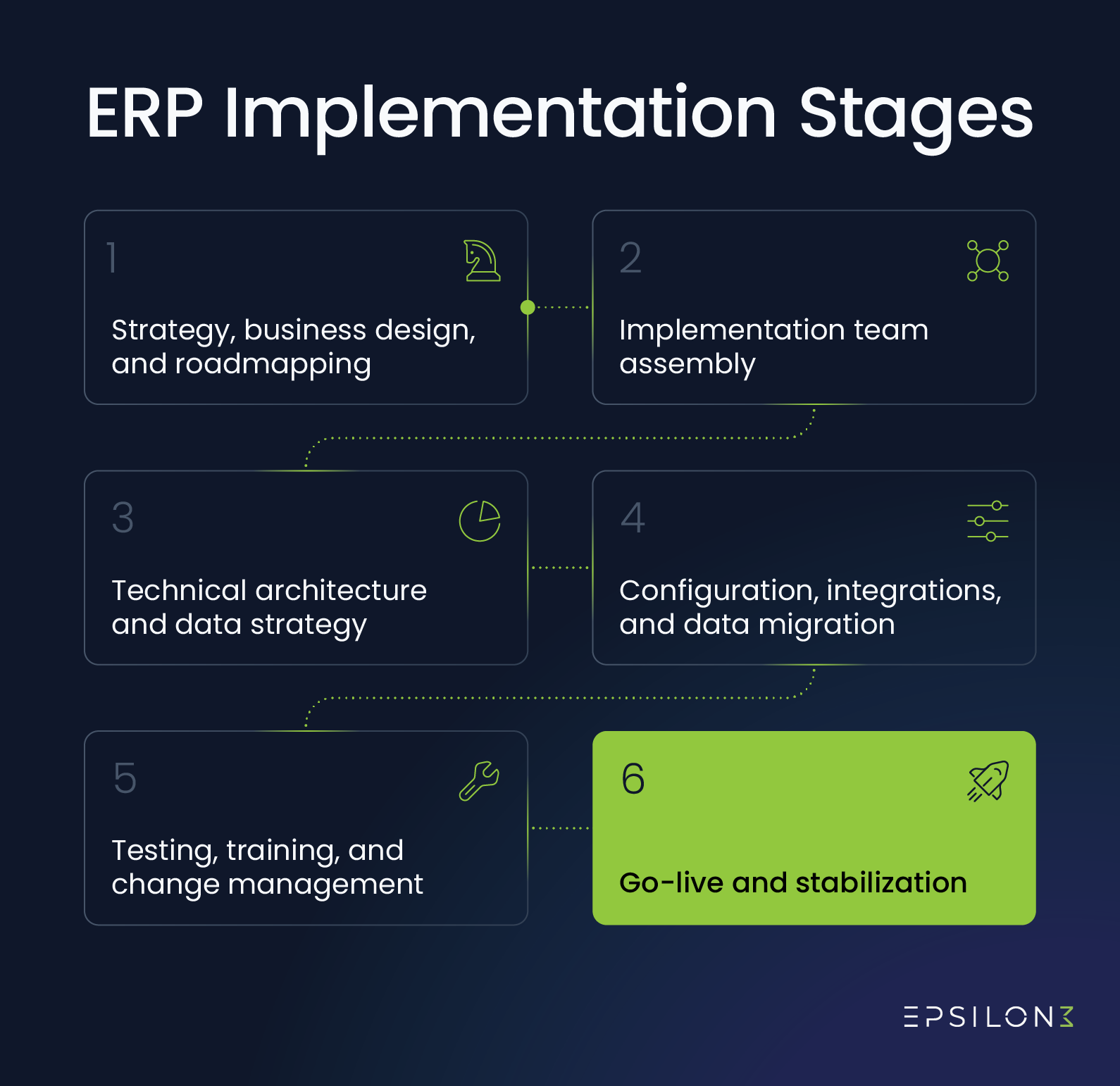
The process typically involves multiple phases: Strategy & Planning, Team Assembly, Technical Architecture & Data Strategy, Configuration & Data Migration, Testing & Training, and Go-live & Stabilization.
Common deployment approaches include Big Bang (faster, higher risk), Phased Rollout (lower risk, longer timeline), Pilot (for real-world testing), and Hybrid models.
Enterprise resource planning (ERP) implementation often costs tens of thousands to millions of dollars. If it goes according to plan, the return on investment (ROI) can be outstanding. However, many projects suffer from issues like unclear scope, insufficient leadership buy-in, or employee resistance. These can cause you to spend more than expected and see short-term disruption before benefits.
In this article, we’ll guide you through the six key phases of successful ERP implementation. You’ll learn about upfront planning, team assembly, technical architecture, and system deployment. We’ll also help you set realistic expectations around timelines, budgets, and risks.
What is ERP implementation?
ERP implementation is the process of adopting an enterprise resource planning solution. The goal is to streamline or consolidate business functions, like finance and supply chain management. Approaches differ, but it’s often a long-term process due to the many tasks involved.
For example, ERP implementation requires software integration, data migration, and workflow restructuring. You also have to retrain your employees and help them adapt to a new way of doing things.
6 Phases for Successful ERP Implementation
Careful upfront planning and a complete project team are essential ingredients for successful ERP implementation. It’s also important to lay a balanced technical foundation, clean data before migration, and test systems before go-live. Throughout each phase, employee training and support should be a priority.
Phase 1: Strategy, Business Design, and Roadmapping
Successful ERP implementation begins with setting strategic goals, designing new business processes, and building a project roadmap. In other words, determine what “success” means, how it will transform workflows, and what steps you’ll take to get there.
This phase is about taking your ERP initiative from boardroom idea to functional blueprint. You want to keep your team’s efforts aligned, minimize the need for rework, and prevent budget overruns once the project kicks off.
Start by creating a mission statement that captures the main goals of your ERP initiative. Then, choose key performance indicators (KPIs) that translate those goals into measurable outcomes. This makes “success” more concrete.
For example, say you want to improve operational efficiency and drive overall profitability. You might track total ROI, inventory turnover, and weekly hours spent on manual data entry.
Next, conduct a detailed gap analysis for your core functions, like quote-to-cash and procure-to-pay. This helps you design more efficient business operations that leverage your ERP system’s capabilities. The technique involves:
“As-is” process mapping: Document your current business processes to clarify existing operations.
“To-be” process design: Define how business processes would ideally work after implementing the ERP system.
With this, you can build a roadmap to your end state with realistic budgets and timelines. You can also identify where a new ERP’s features may be insufficient for your ideal workflows, informing product selection and customization decisions.
Action Items
Draft a mission statement that captures the main goals of your project.
Pick 3-5 specific KPIs that translate those goals into concrete outcomes.
Document "as-is" processes and design ideal "to-be" workflows for core business functions.
Build a realistic roadmap to your desired end state, including budgets and timelines.
Phase 2: Assembling the Implementation Team
ERP software implementation is a people project disguised as a technology initiative. Success depends heavily on the team managing the transition—they need a healthy balance of strategic leadership skills and hands-on expertise.
Here are some of the most important individuals to include in your implementation team:
Executive sponsor: A C-suite leader who can advocate for the ERP initiative
Functional leads: Key end users from affected departments who understand current pain points
Project manager: Someone responsible for coordinating operations, maintaining timelines, and enforcing budgets
IT and data specialists: Tech experts who can manage configuration, integration, and migration
Implementation partner: An ERP implementation consultant who can provide in-depth software guidance
Change management lead: Someone to lead in helping employees adjust to the new system
Action Items
Secure an executive sponsor with decision-making authority and budget ownership.
Assign a project manager and give them details on timelines, budget, and scope.
Identify functional leads from each core department and formalize their time commitment.
Hire ERP implementation services and align on roles, responsibilities, and KPIs.
Designate a change management lead and define their communication and training responsibilities.
Phase 3: Technical Architecture and Data Strategy
This phase is when you lay the “plumbing and wiring” for your ERP system. It’s about building the underlying technical framework that will support your business logic and data flows.
Start by mapping your integration landscape. Define how the ERP will connect to existing applications across your organization, including your payroll system, customer relationship management (CRM) tool, and banking platforms.
Next, establish a clear data governance model. This determines which systems and departments own various types of information. It’s one of the keys to making your ERP system a reliable single source of truth. Common approaches include:
Centralized models: A central body owns all data and governs standards for requesting it.
Decentralized models: Each department is responsible for managing and governing its own data.
Hybrid models: A central body sets data governance standards while individual departments execute them.
Hybrid models are often the most practical for ERP environments, as they offer a balance of flexibility and consistency across the organization.
Lastly, design a security architecture to protect sensitive data. Role-based access control (RBAC) models are often effective. They ensure end users only see what is necessary to do their jobs.
However, attribute-based access control (ABAC) may allow for more granular permissions. They grant access to data using a combination of factors, not just user roles. That often includes multiple user demographics and data properties.
Action Items
Secure an executive sponsor with decision-making authority and budget ownership.
Assign a project manager and give them details on timelines, budget, and scope.
Identify functional leads from each core department and formalize their time commitment.
Hire ERP implementation services and align on roles, responsibilities, and KPIs.
Designate a change management lead and define their communication and training responsibilities.
Phase 4: Configuration, integrations, and data migration
With a technical foundation established, the execution phase can begin, shifting your focus from planning to building. The heavy lifting should fall on implementation consultants, IT experts, and data specialists.
Have them start by configuring and integrating your ERP system. This involves setting up modules and connections according to the Phase 1 blueprint.
Some customization may be necessary to meet your business’s unique needs, especially for industry-specific requirements or complex operations. For example, it may be worth investing in integrating your new ERP with a critical legacy manufacturing system.
However, be careful not to fall into the pitfall of over-engineering. Each additional customization erodes budgets, delays timelines, and complicates future updates. The project manager should be responsible for managing scope changes.
You must also prepare company data for migration to the new system. This involves standardizing formats for things like dates and names. It also means addressing any duplicate, missing, or inconsistent records.
Avoid cleaning data manually, as this is slow and prone to error. Instead, use data matching and validation tools to help automate the process. You can then migrate the data with less risk of inefficiencies or downtime after go-live.
Action Items
Secure an executive sponsor with decision-making authority and budget ownership.
Assign a project manager and give them details on timelines, budget, and scope.
Identify functional leads from each core department and formalize their time commitment.
Hire ERP implementation services and align on roles, responsibilities, and KPIs.
Designate a change management lead and define their communication and training responsibilities.
Phase 5: Testing, training, and change management
This phase is the dress rehearsal before go-live. This is when you confirm that the new ERP system works as intended and that employees are ready to use it.
User acceptance testing (UAT) is a natural starting point. It involves key end users completing workflows under realistic scenarios in the new system. For example, that might include processing orders or closing the books. These exercises help reveal any final “punch list” issues to address before rollout.
Training should be ongoing, but it’s especially beneficial during this phase. Focus on role-based training that teaches employees what's necessary for their specific jobs. This is more efficient than offering a generic system overview.
It’s also important to prioritize other aspects of change management. Make sure employees know what to expect during the transition and where to go for help. Leadership support and clear communication channels can help reduce confusion and resistance.
Action Items
Secure an executive sponsor with decision-making authority and budget ownership.
Assign a project manager and give them details on timelines, budget, and scope.
Identify functional leads from each core department and formalize their time commitment.
Hire ERP implementation services and align on roles, responsibilities, and KPIs.
Designate a change management lead and define their communication and training responsibilities.
Phase 6: Go-live and stabilization
At this point, your new ERP system is ready for go-live. Deployment strategies can vary significantly, and choosing the right one is an important step in balancing your various business needs.
Here are the primary factors to consider:
Risk tolerance: How important is it to limit your exposure to disruption? If preserving operations is essential, consider a more gradual approach. For example, you might deploy the system one department or module at a time.
Timeline and budget constraints: Cautious deployment approaches may help preserve operational stability. However, they can also delay project completion and increase costs.
Whatever strategy you choose, go-live isn’t the finish line—it only marks the transition into hypercare, a period of elevated support where the focus shifts to stabilization.
In the weeks after rollout, issues will likely surface that you didn’t identify during testing. Timely triage is important to limit productivity loss and user frustration. Your implementation partner’s expertise will often be invaluable, as well as the change management systems you put in place.
Action Items
Execute a deployment strategy aligned with risk tolerance and operational constraints.
Launch a hypercare period with elevated resources going toward stabilization and user support.
Keep consultants engaged to benefit from their ERP implementation support and system expertise.
ERP Implementation Strategies
ERP system implementation strategies exist on a spectrum. They range from rapid, simultaneous deployments to more gradual, controlled rollouts. Faster approaches provide ROI sooner but carry a higher risk of disruption. Slower strategies prioritize stability at the cost of longer timelines and higher expenses.
Big Bang
The Big Bang approach deploys an ERP system across your organization at once. It often works best for small to medium-sized businesses with fewer system customizations. Conducting rigorous testing and change management upfront can also improve its effectiveness.
The main advantage is speed. You avoid running parallel systems and shorten timelines. The primary downside is the increased potential for disruption—if issues arise, they affect your entire operation.
Phased rollout
A phased rollout introduces a new ERP system in stages, such as by module or department. It’s often beneficial for enterprise-level businesses, especially those with complex data architectures.
This approach reduces risk by limiting initial exposure and allows employees to adapt incrementally. However, it’s slower and requires you to maintain old and new systems simultaneously. This, in turn, increases cost and complexity.
Pilot implementation
The pilot strategy involves deploying in a limited capacity before full implementation. For example, you might perform a trial run with a single department or business division.
This can be a good approach when you believe a real-world test will provide better insights than UAT. It’s another effective way to reduce the risk of disruption or user rejection; however, it adds an additional deployment cycle and delays timelines.
Hybrid approach
A hybrid ERP implementation plan pulls tactics from multiple other strategies. For example, you might conduct a pilot test in one department and perform a phased rollout across the others.
This is typically ideal for businesses with unique needs that make a customized approach beneficial. However, it requires additional planning and may be trickier to execute than more standard methods.
Streamline ERP Implementation With Epsilon3
Epsilon3 is a process and resource management solution built for complex operations. It can transform even the most complicated ERP implementation phases into an organized set of guided procedures.
The platform combines digital flowcharts, real-time progress tracking, and if/then logic automation, empowering you to streamline everything from as-is documentation to post-rollout workflow execution.
FAQ
-
The Panorama Consulting Group’s 2024 ERP Report found that the median ERP implementation took 15.5 months. However, it depends on factors like business complexity, specific ERP software, and implementation approach.
For example, a small business adopting an out-of-the-box solution might need six months. Meanwhile, an international enterprise with heavy customizations might need up to three years.
-
According to the Panorama Consulting Group’s 2024 ERP Report, the median ERP implementation cost is $450,000. However, actual costs can vary significantly, often depending on the same factors that impact timelines.
For example, a small business might pay only $25,000, while a global enterprise could spend millions of dollars.
-
ERP software can help solve problems like data silos, manual workflows, and poor collaboration. It supports system integrations and centralizes data, which helps automate processes and create a single source of truth.
-
You should consider a phased ERP rollout if your business workflows are complex or you want to minimize the risk of disruption. A phased rollout makes change management easier and limits initial exposure to the new system. However, it can also increase project complexity, delay timelines, and add costs.

If you are a current user of Epsilon3, contact support@epsilon3.io for the review link to earn $50 before submitting.