
Welcome to the latest edition of the Epsilon3 Changelog, covering release versions v1.238 - 1.240. We’re in the final stretch of 2026, but our team has a few final surprises to close out the year (more on that soon!). First up, we’ve launched Preventative Maintenance to all customers, now bringing the same rigor you expect from Epsilon3 to your maintenance and MRO process. We already record the hours, cycles and readings your procedures capture; now that record schedules the maintenance, flags what's due, and keeps equipment off the floor until it's serviced. Changelog #109 also brings staged issue approvals, conflict detection on the schedule, versioned snippets and custom inventory layouts. Most of it started as a customer request, so keep the feedback coming!
Company & Customer News:
Epsilon3 launches Preventative Maintenance: maintenance scheduled on what each asset actually went through, not the calendar
Sidus Space will make the cable assemblies for Argotec's HAWK satellite platform
Portal Space Systems reached orbit for the second time this year when its Starburst-1 spacecraft launched on a SpaceX Falcon 9
TL;DR:
Issue Stages and Approvals
Preventative Maintenance
Manage Resource Conflicts
Snippets Versioning
Custom Forms and Layouts for Inventory
New! Issue Stages and Approvals
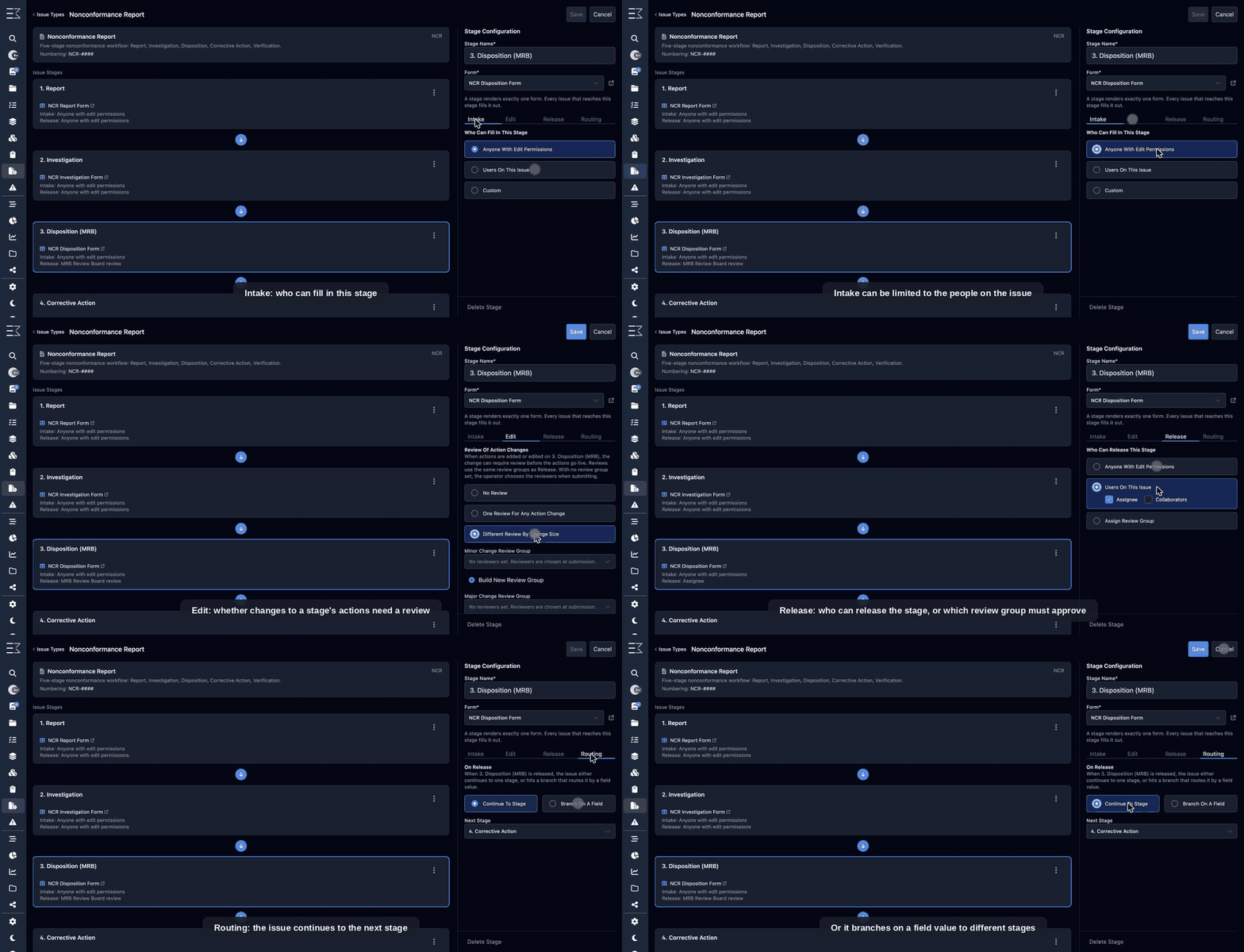
Quality teams told us a nonconformance isn't a checklist. It's triage, resolution and disposition, each with its own sign-off. Issue types can now define a flow of stages, so an issue moves through the steps your process calls for rather than working from a single list of actions. Each stage defines its own form, actions, and editing rules. Default actions are now part of the issue form, so a stage starts with the actions of the form it uses. A stage can also be configured to route to different stages based on an operator's choice, and a review can be required before a stage's actions are edited or before it progresses to the next stage. Existing issue types and issues are converted to a single stage with their current actions, so nothing changes until you're ready.
New! Preventative Maintenance
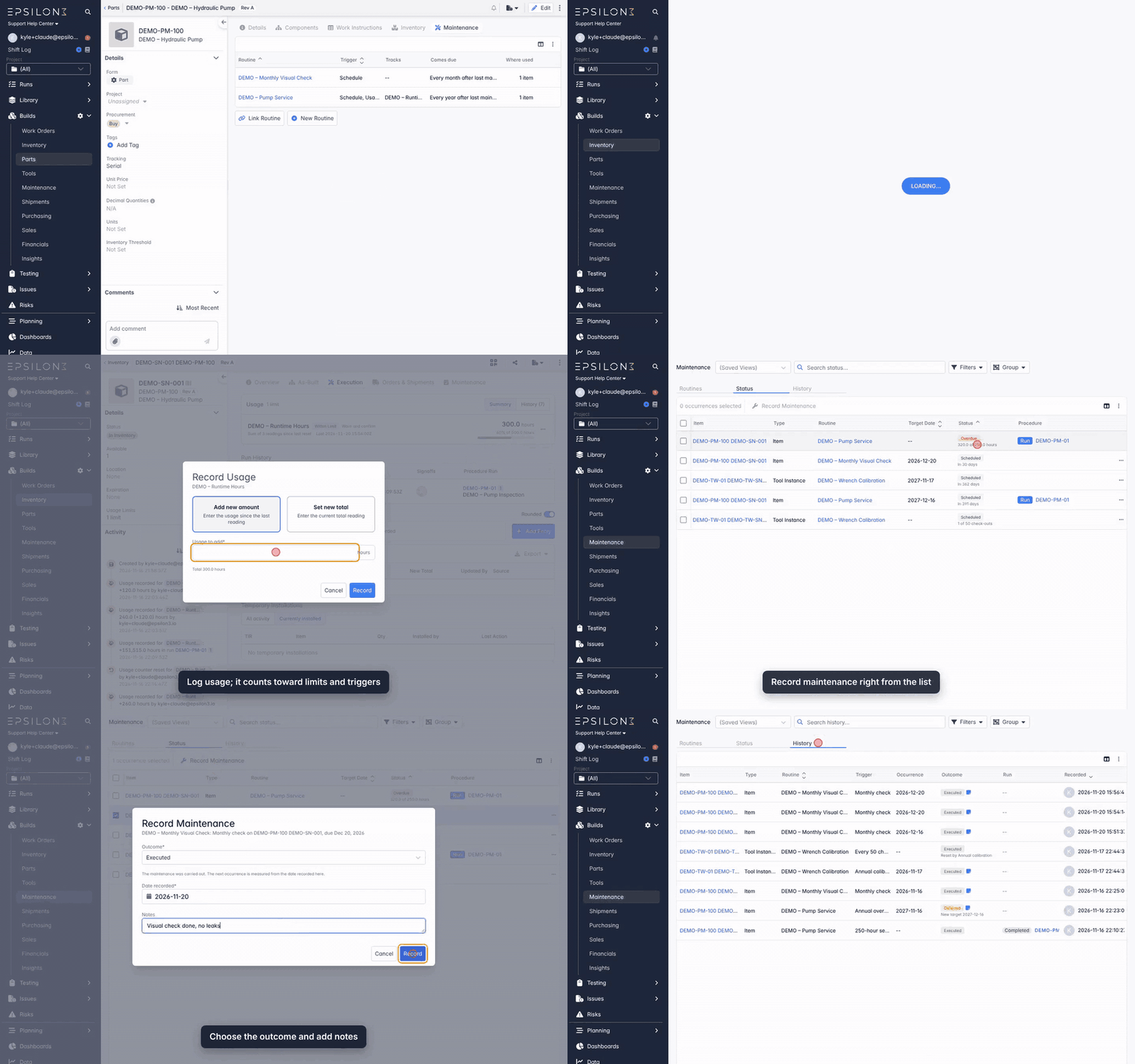
Track usage such as cycles, runtime hours, or tool checkouts on your parts, tools, and locations. Then, build maintenance routines with schedule, usage, or checkout triggers that mark items as Due Soon, Due, or Overdue. From Builds > Maintenance, your team can start the linked procedure in one click, or record the work as executed, deferred, or canceled. You can also block an item from use until it has been serviced. Instead of tracking service intervals in spreadsheets, customers get one place to catch maintenance before it’s missed, keep equipment that’s due for service off the floor, and keep a complete service history ready for audits.
New! Manage Resource Conflicts
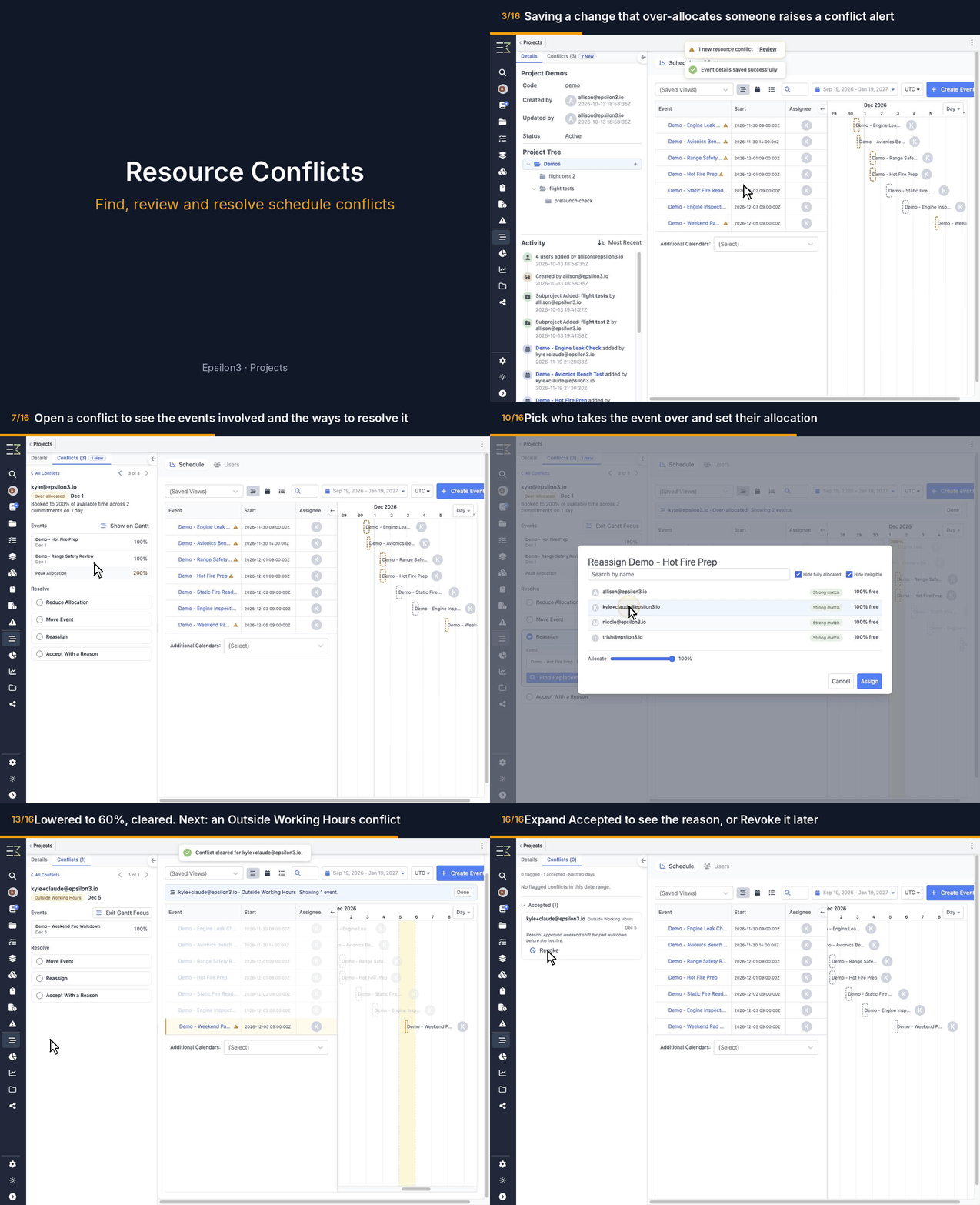
The project schedule now flags any person, tool, or location booked for two events at once, scheduled outside its working hours, or due for maintenance. You can reassign or accept each conflict from the sidebar. Additionally, you can now add requirements to an event, like two certified technicians, and we'll show you the best available resources to staff it - catch double-bookings early and staff events without the back-and-forth.
New! Snippets Versioning
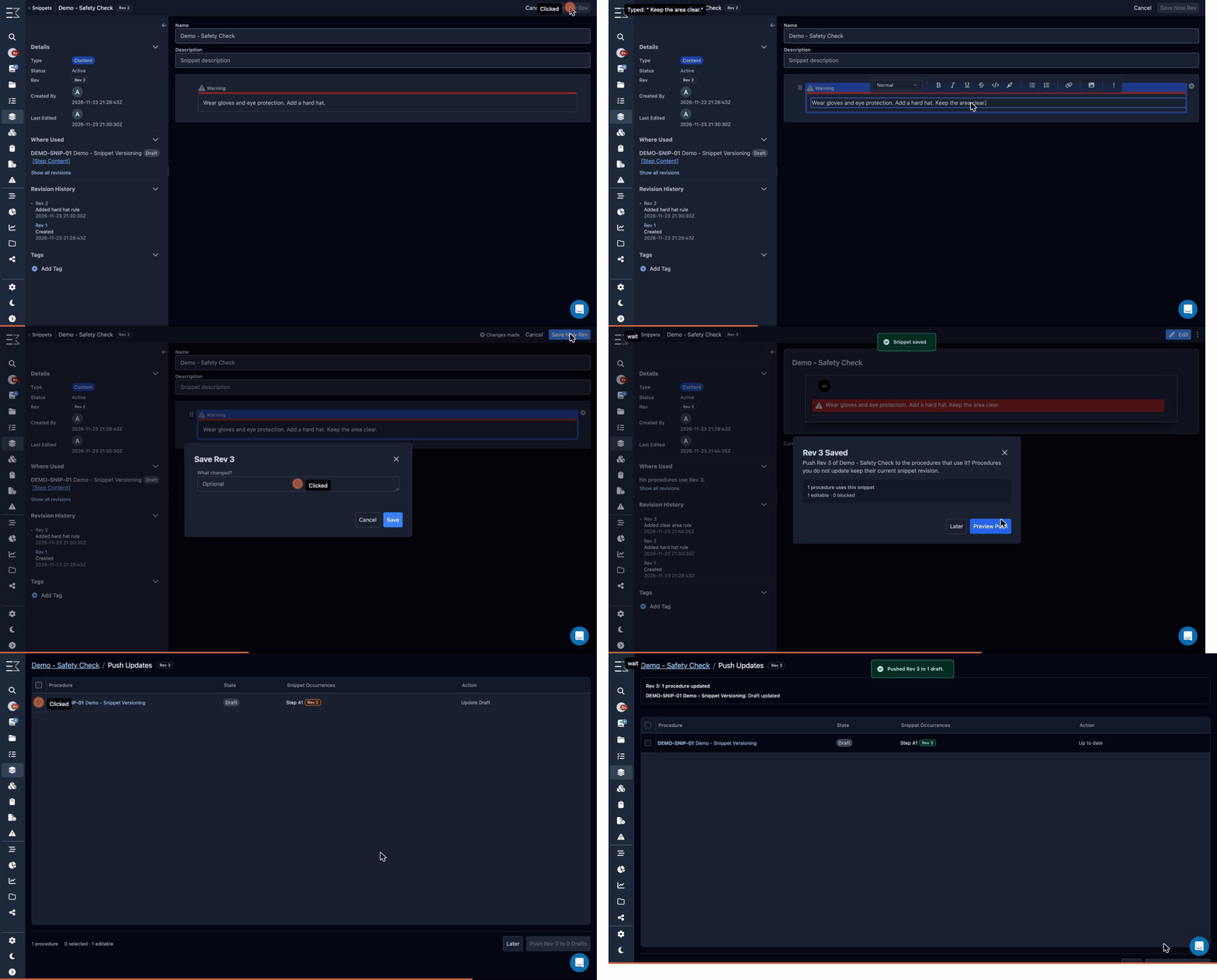
Each time you save a snippet, it gets a new revision, and the procedures that use it stay on their current revision until you choose to update them. From the snippet, open “Where Used” to see every procedure that uses it, then use Push Updates to send the new revision to the procedures you pick. In the editor, an out-of-date snippet is flagged so authors can update, ignore, or detach it. This lets teams change shared content on purpose and with full traceability, without silently altering released procedures. With Procedure Validation set to Strict, a procedure can't be released while it uses an out-of-date snippet.
New! Custom Forms and Layouts for Inventory
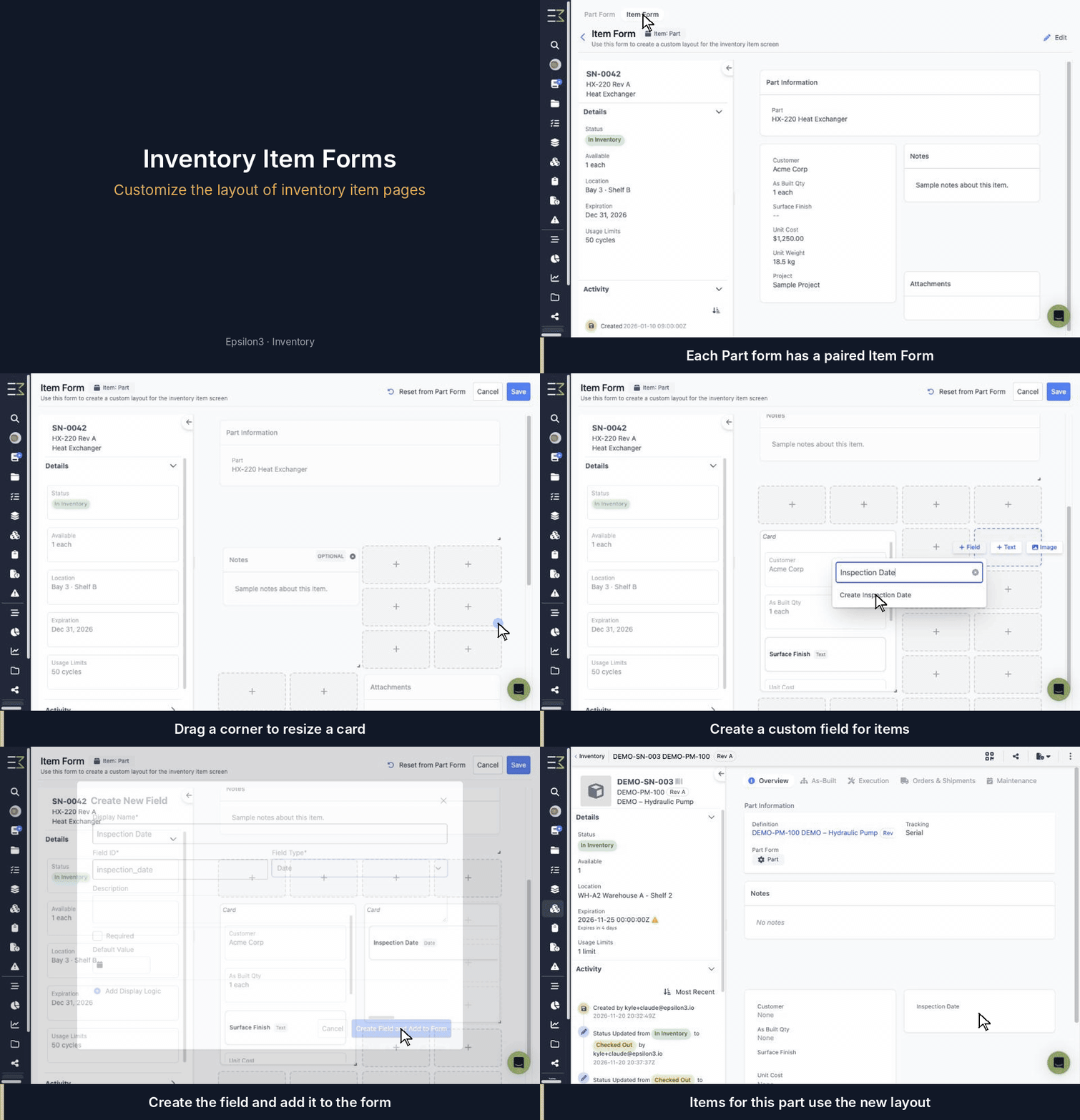
You can now customize the inventory item page. Each Part form has a paired Item Form: the Part form lays out the part page, and the Item Form lays out the page for that part's inventory items, so different kinds of parts can have different item pages. In Build Settings → Forms, open a Part form and select the new Item Form tab to rearrange an item's Overview and sidebar. You can move and resize cards such as Item Details, Notes and Attachments, hide the ones you don't need, and add custom fields for items in the same editor.
Improvements & Fixes:
Add participants column to ended runs list
Allow changing work order project
Allow section skips to bypass mandatory steps
API Updates Telemetry
Bild PLM Integration
Bulk Edit the Project assignment for Runs
Custom fields for events
Custom Fields for TIR Logs
Custom fields: multi select lists, longer descriptions, searchable field picker
Dark Mode
Dictionary groups supported as the only data source for commands and telemetry
Duplicate work orders
Filter Runs, Procedures, Work Orders, and Issues by custom fields
Filter the Runs List by Participants
Link an existing active run from a procedure link block
Lot Tracked Tools
Printing improvements for Purchase Orders
Require typing to confirm tool and tool instance deletes
Review actions activity log for released procedure revisions
Run duration estimates based on run history
Show each run's parent in the runs grid and run details
Suggested Edits
Weight Units - Metric vs Imperial

If you are a current user of Epsilon3, contact support@epsilon3.io for the review link to earn $50 before submitting.