
Welcome to the latest edition of the Epsilon3 Changelog, covering release versions v 1.235 - 1.237.
You asked, we listened. Two of our latest updates came straight from customer demand. Part demand statistics like Current Demand and On Order now update in real time, so the numbers you plan against stay current as work happens. And because many of you asked how Epsilon3 performs at scale, we’ve published our performance and scalability numbers for anyone to review. Your feedback shapes what we build next, so keep it coming.
TL;DR:
Inventory Shelf Life: Set a shelf life on parts and tools so expiring and expired items are flagged, and controlled, before they reach a build.
Weight Logs: A full weight history for every item, from inventory edits to the run steps that change an assembly.
File Import Dispositions: See exactly what happened to every row in your Parts, Inventory, and Tools CSV imports.
New! Inventory Shelf Life
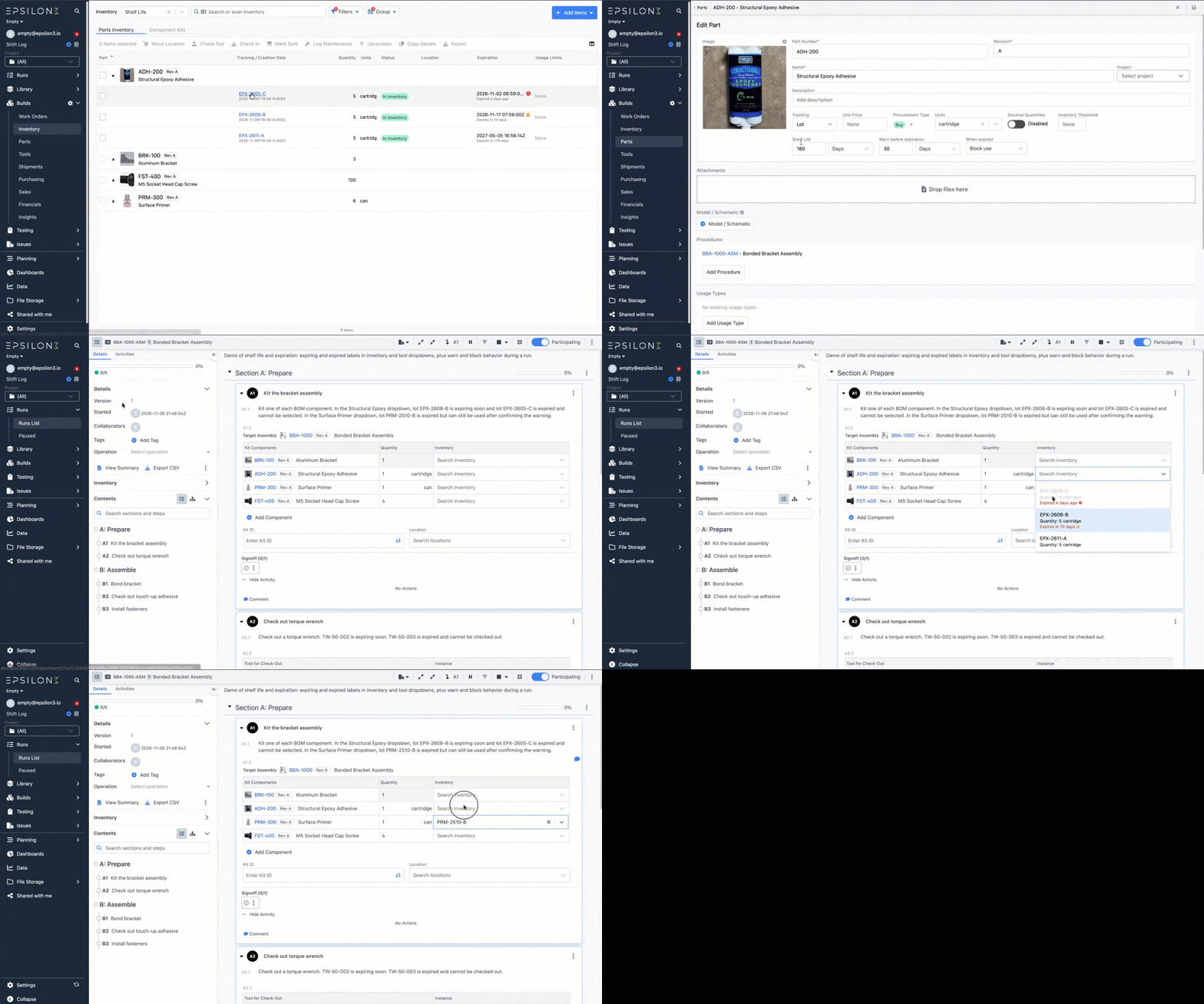
Parts and tools now support shelf life.
Set a shelf life on a part or tool, along with an optional warning window, and every new inventory item or tool instance gets an expiration date automatically. You can also set or adjust it per item or through CSV import.
Expiring and expired items are labeled in inventory lists and in selection dropdowns during runs, and you choose what happens when someone picks an expired one: allow it, warn before use, or block it. That way an expired epoxy lot or an out-of-date torque wrench never makes it into a build.
New! Weight Logs
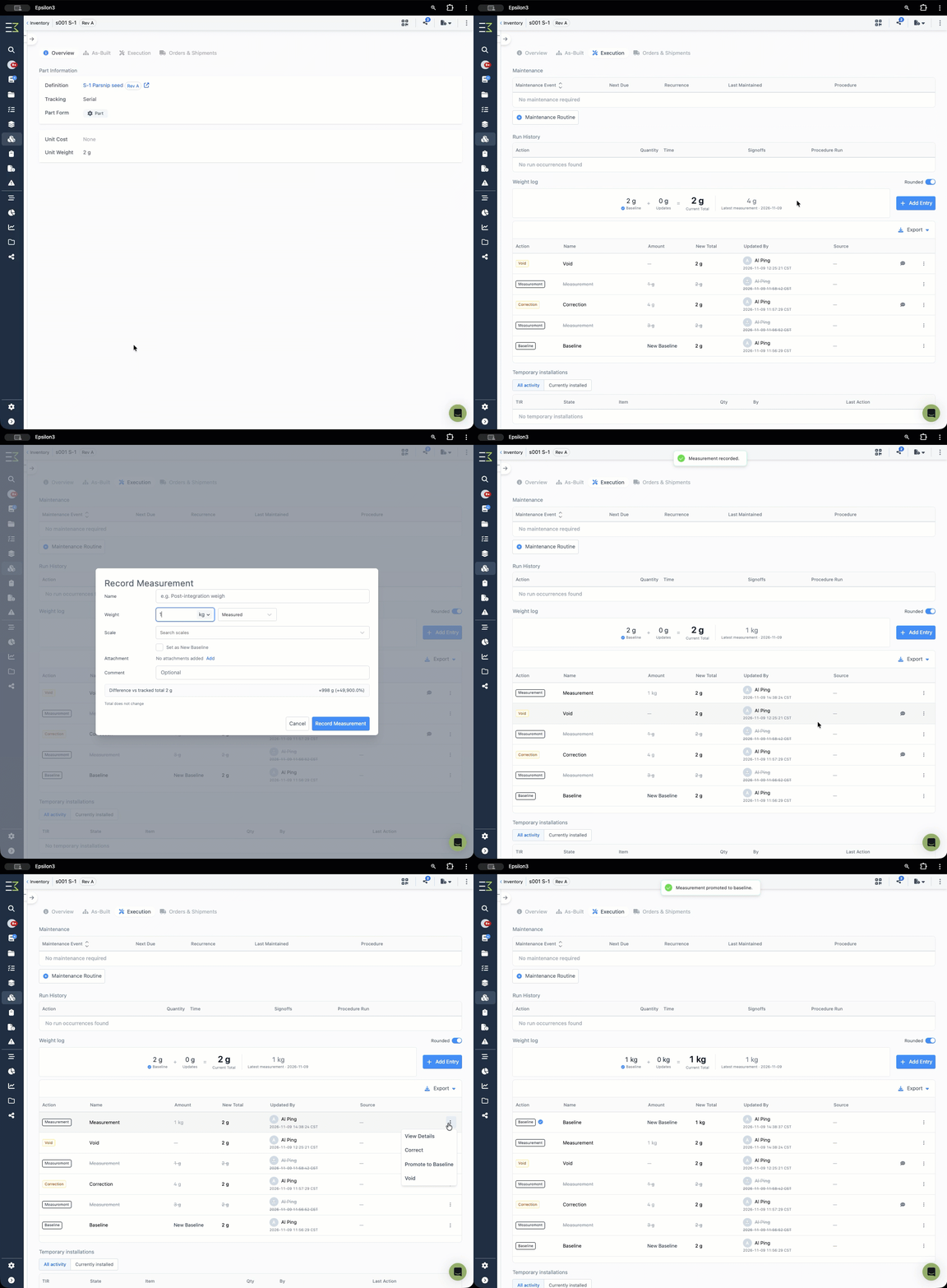
A full history of the weight of an item can be found in the item detail page. From here we can capture measurements and set baselines, as well as view prior measurements. These include edits to the weight of the item in the inventory, as well as steps in runs which can affect the weight of an item, such as adding/updating components on the assembly as well as temporary installs.
New! File Import Dispositions
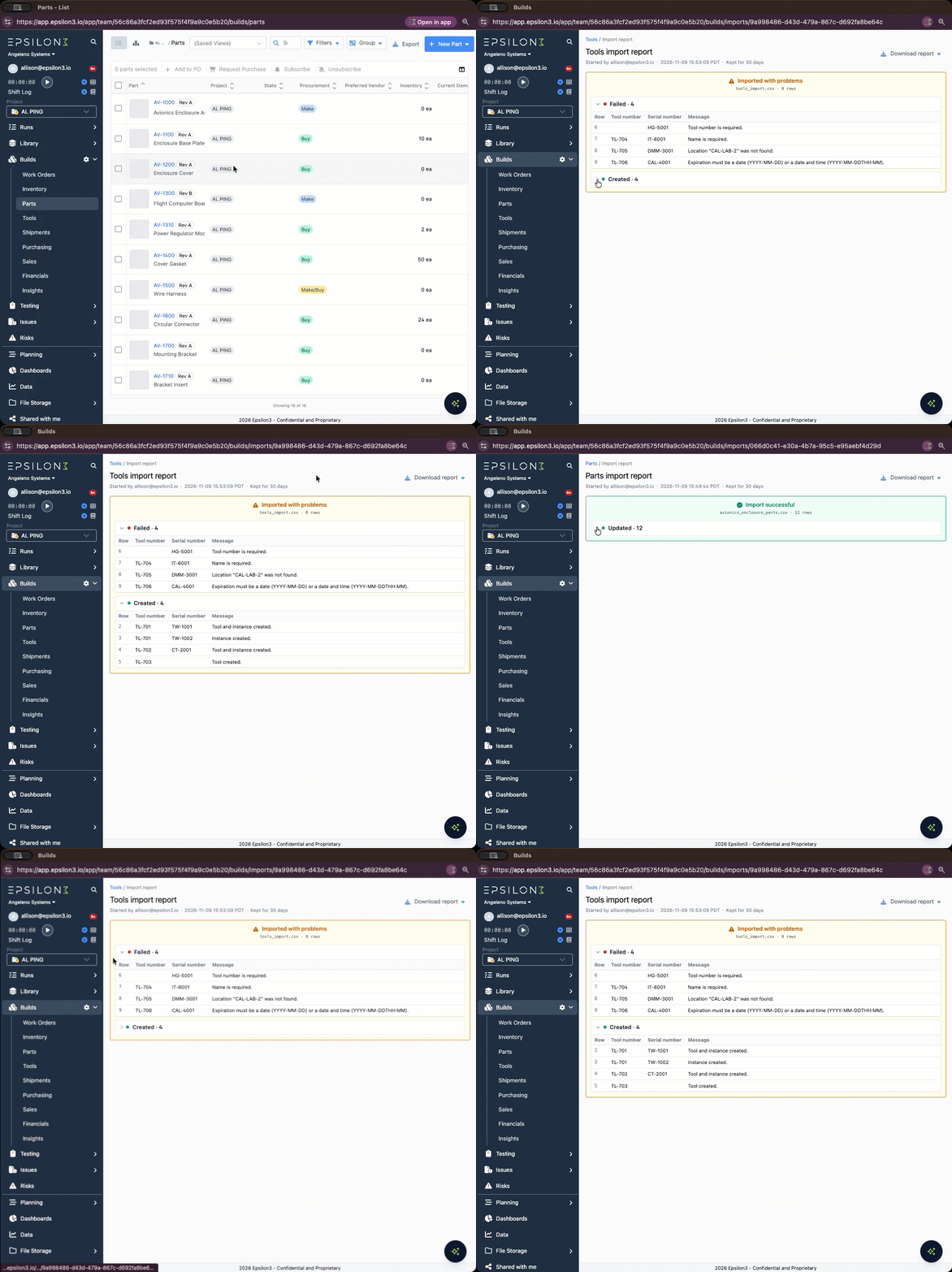
Parts, Inventory, and Tools imports now show what happened to every row, so you can quickly find and fix anything that needs attention.
Row results: every row is marked Created, Updated, Pre-Existing, Warning, or Failed, with a clear message.
Report page: rows are grouped by outcome, and reports are kept for 30 days.
Download report: the original CSV with result columns added. Download all rows, failed rows only, or successful rows only.
Drag and drop: drop a file onto any upload window.
Improvements & Fixes:
API - Notifications
Run Step & Section Activity
Issue Step Activity
Acceptance of Suggested Edits
API - Capabilities
Edit GL Accounts
Edit Run Pauses and Constraints
Edit Shelf Life Settings
Filter Runs by Section and Step Numbers
Filters on Vendors
Include shipment receipts in PO received items
Specify Procedures on Work Orders
Reject BOMs containing cycles in the API
Tools CSV import to allow editing of existing tool instances
Add tabs to the Inventory Item Detail page
Parent locations to be assignable in location select
Part demand columns to be added as system fields in part detail
Add custom fields as columns to Runs list view
Archive snippets and tools
Check a part draft out and back in with a revision lock
Compare Draft Procedures in Compare Versions
Cross-Org Usage export for Org Admins
Dashboard support for Items Sold
Edit an event's linked procedure/run and dependencies
Image annotation in snippets
Include step and section numbers when linking Issue Impacts
Make run activities filterable to only comments or only actions
Manually reorder components on a part BOM
POs - Option to exclude fields when printing (e.g. internal fields)
Procedure Validations
Screenshot and paste in procedure edit on Windows
Show step activity under issue action steps
Suggested Edits - Allow adding and removing section headers
Warn when a paid role is assigned but no paid seat is available

If you are a current user of Epsilon3, contact support@epsilon3.io for the review link to earn $50 before submitting.