
Welcome to the latest edition of the Epsilon3 Changelog, covering release versions v 1.219 - 1.223. It’s been a busy July for us at Epsilon3 on the road visiting customers, hearing about all the ways our new MCP server is helping save operators time on the platform, and getting great feedback on what courses we should build next in Epsilon3 University. Have an idea for us? Reach out at info@epsilon3.io.
TL;DR:
Financials
Issue Types
Procedure Edits
Performance Improvements
Notifications Expansion
API Expansion
New! Financials
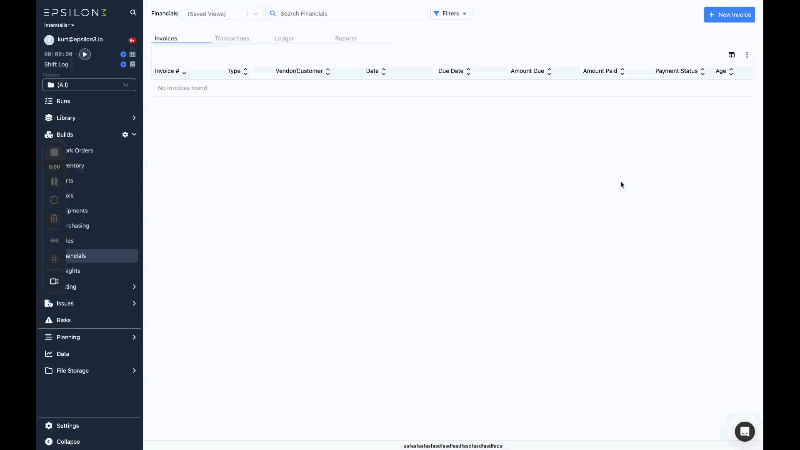
Ledger-backed accounting that lives with your operational data — no separate system, no double entry of the same information. Create AR invoices directly from sales orders and AP invoices from purchase orders, pulling line items from one or many orders at a time. Record full or partial payments against any invoice and watch the remaining balance update automatically. Every invoice, payment, and manual journal entry posts balanced debits and credits to a real double-entry ledger, and unbalanced entries are rejected before they can throw off your books.
The Ledger view rolls up all account activity in a collapsible hierarchy, with balances rolling up to parent accounts and postings restricted to leaf accounts so the structure stays clean. Get started fast by importing your full chart of accounts from a CSV, and export any grid — ledger, transactions, or invoices — to CSV for reporting and reconciliation in external tools.
New! Issue Types
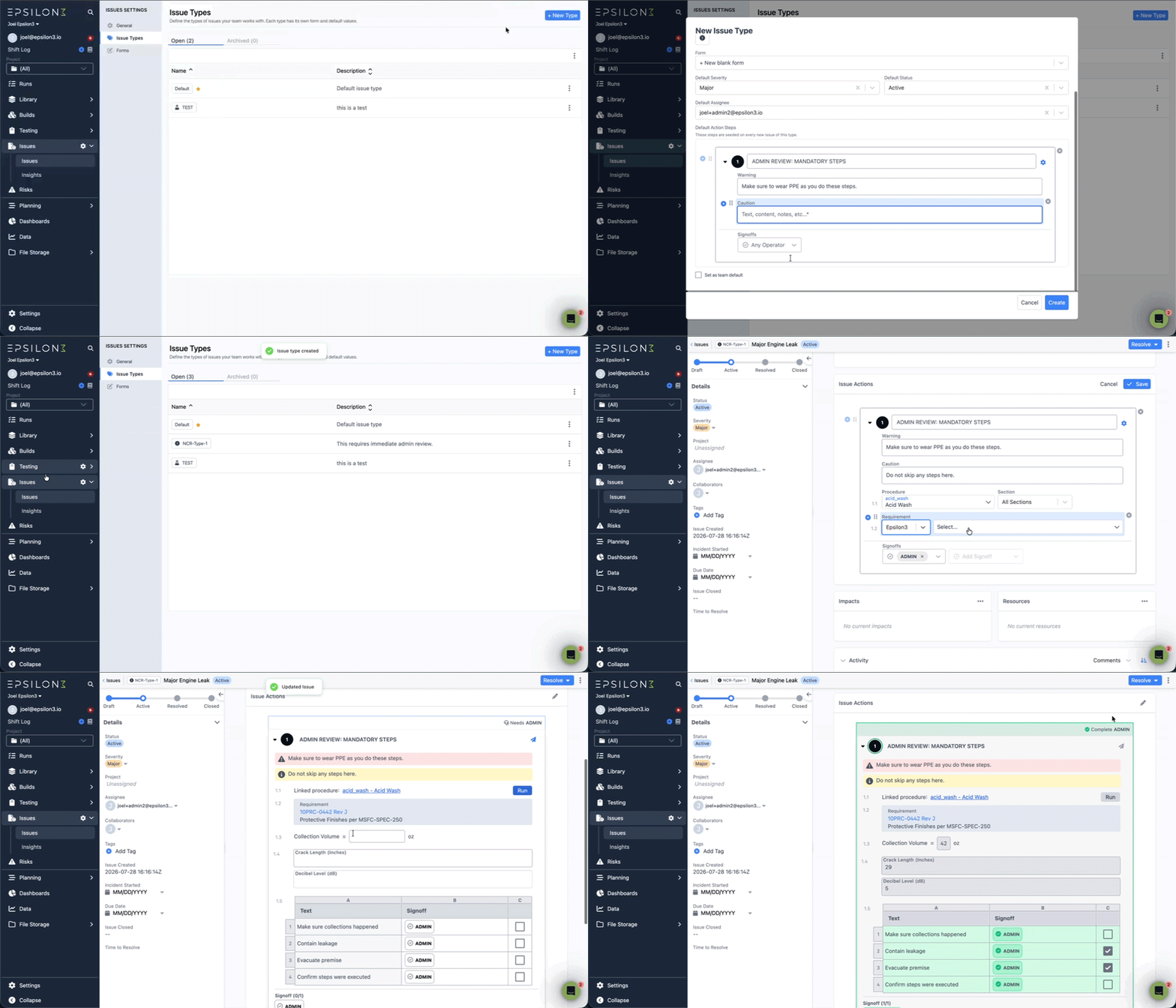
Users can now configure Issue Types, which support default values and default action steps for Issues, in addition to making more fields configurable on creation (i.e. whether the Issue is created as active, who it’s auto-assigned to). Issue Types also have changed the ID value for Issues. Now Issues will be indexed by their Issue Type, and they’ll have an identifying prefix that makes it easier to see what type of Issue it is.
Additionally, we have expanded the content blocks available on Issue Actions to include Field Inputs, Field Input tables, Tables, Attachments and Requirements.
Lastly, if a step on an Issue was signed off, we’ve locked it so that it cannot be edited until the signoff is revoked.
Issues can now be tended by nonconforming parts in Dashboards, and the Insights part chart is clickable so you can drill from a part into the issues behind it.
New! Procedure Edits
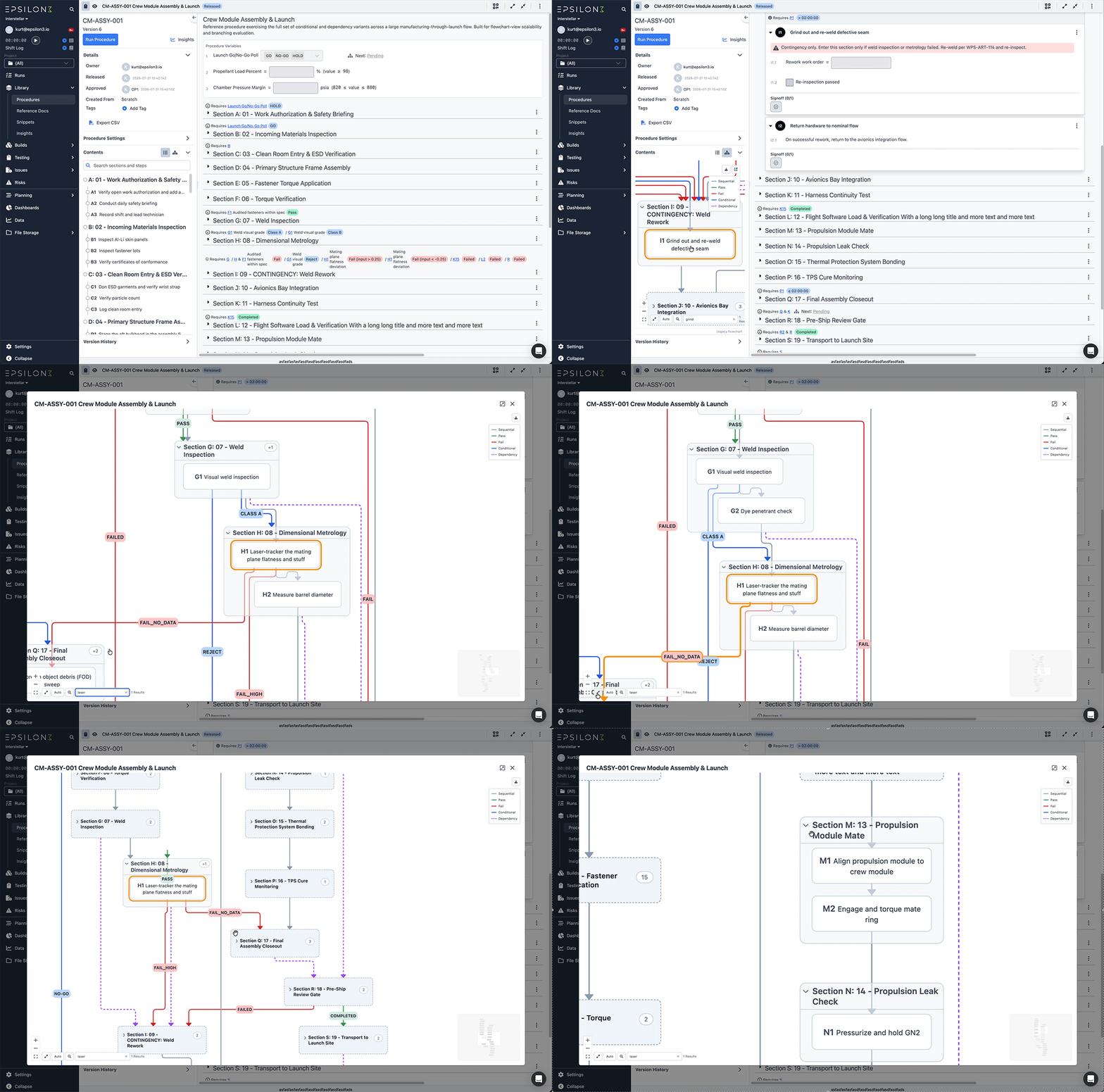
The flowchart view got a major layout and usability upgrade. It now opens focused on just the sections and steps involved in dependency flow, so even complex procedures are readable at a glance
Expand any section when you need to see its full step detail, then collapse it again. Better routing and color-coded lines with click-to-highlight make it easy to trace the paths. Use search to quickly find text matches and center them in view, and when the flowchart is open in the sidebar, clicking a step scrolls to it in the procedure. Export as a high- definition image for saving or printing.
Suggested edits
The scope of suggestions that can be made to a run is expanded to include adding a section, editing step headers, and removing step conditionals
Signoffs
You now have the flexibility to quickly associate a role with a skill in any signoff in a procedure, including start/end run signoffs and table signoffs.
Suggestions for frequently-used signoffs appear while editing.
Help Center Articles: Flowchart, Suggested Edits, Copy from Runs, Diffing Different Procedures, Augmented Sign Offs with Skills
Improved! Performance Improvements
We have been busy making various improvements to support our customers with a large number of parts, tools, and steps in procedures.
Key updates include:
Enhanced capabilities for paging, sorting, and filtering options server-side within the part and tool selection dropdowns to accommodate workspaces managing extensive quantities of parts or tools.
Upgraded performance optimizations tailored for runs containing a high volume of steps or steps with extensive field inputs.
Full server-side integration for sorting, filtering, and paging across our parts, tools, and inventory list APIs.
Comprehensive server-side support introduced for paging, filtering, and sorting inside the Parts and Tools grid views.
New! API Expansion
Expanded API capabilities with new endpoints and enhanced querying support, enabling greater and more granular access to platform data.
Snippets Retrieve API with flexible querying options for retrieving and filtering snippets
Chat API for accessing and managing conversations and comments for supported entities
Project Schedule API for retrieving project scheduling information
Skills API for managing and accessing skill-related data
Procedure Filtering to support filtering procedures by Draft and In Review status
Requirements API for accessing and managing requirements data
Roles API for accessing and managing role-based information
Improvements & Fixes:
Add anomaly-detection widget for all dashboard data sources
Add custom fields and grid view for Requirements
Add inline acronym decoration in procedure text
Add inline DOCX and XLSX file preview
Add mark unsold action for sold inventory items
Add search to procedure table of contents
Add Status to Requirements (Draft/Active/Archived)
Add unit cost and weight to inventory export and import
Add unscheduled events to project & WO schedules
Allow checking tools in/out directly
Allow users to delete the latest released part revision
Customizable skill renewal intervals (count + unit)
Dashboard Export + scheduling
Edit Custom Fields without navigating to Settings
EIDP export for inventory items
Ensure tool content blocks honor strict signoff
Highlight signed-off approvals when editing issue steps
Include commanding arguments in search and replace
Log activity when work order notes are updated
Order procedure/run custom fields by the order they were added
Prompt before leaving while an upload or sync is pending
Reopen Section
Setting to notify users X days before this skill is due to expire
Show a tooltip on truncated grid cells
Show Kit ID in assembly item activity log indicating component added

If you are a current user of Epsilon3, contact support@epsilon3.io for the review link to earn $50 before submitting.